


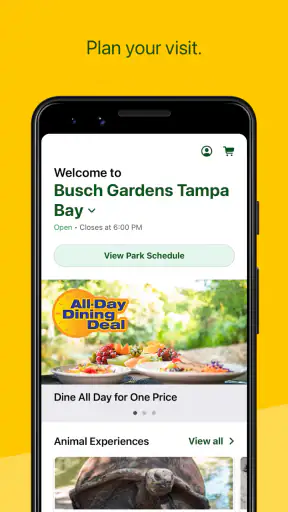
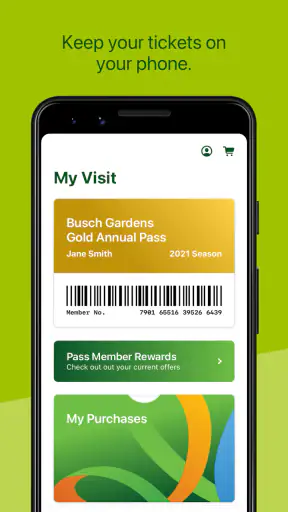
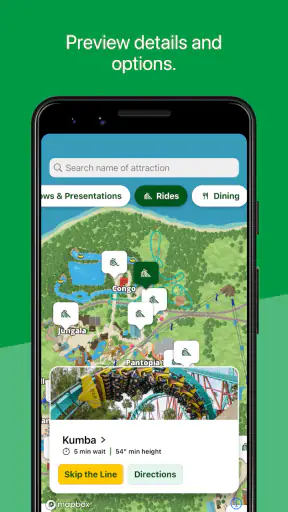
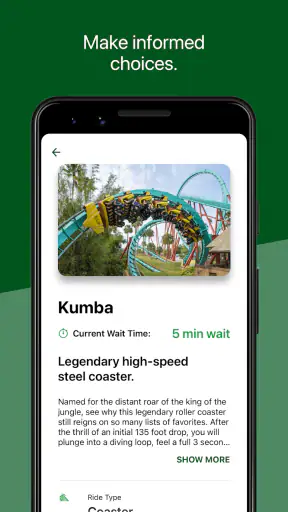
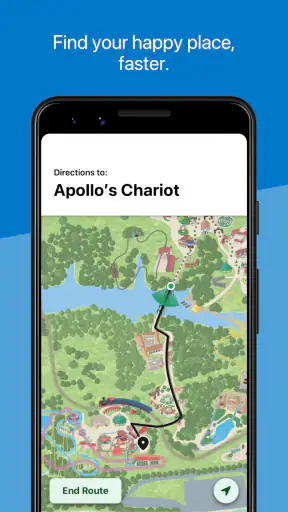
If you are planning a day at Busch Gardens, the official Busch Gardens app is most useful when you treat it as a day-of-visit companion rather than a general travel planner. I found its strongest purpose in bringing the practical details of a park day into one place: maps, wait times, and park hours. Those are the details that can save you from walking across the park for a closed attraction or guessing whether there is still time to fit in one more ride.
The app is a free Travel & Local app from SeaWorld Parks & Entertainment Inc., and its Everyone age rating makes it suitable for families as well as individual visitors. It has been available since December 16, 2011, and its current version is 7.1.63.140594. With more than a million installs, it is clearly intended for visitors who want official park information close at hand rather than relying entirely on printed material or a general map service.
What to expect before you visit
The first thing to understand is the app’s scope. It is built around Busch Gardens itself, not around booking an entire vacation. I would not install it expecting hotel research, broad city navigation, or a replacement for a full itinerary app. Its value begins when you are thinking about the park entrance, the attractions you want to reach, the amount of time you have left, and whether a wait is worth accepting.
That focused approach is a strength. A normal map application may show a destination and driving directions, but it does not give the same park-specific context. A paper map can help you understand the layout, yet it cannot be as convenient when you need to check current information while moving between areas. The Busch Gardens app sits between those options: more useful than a static map for decisions during the visit, but narrower than a complete trip-planning tool.
In my experience, the most important benefit is reducing small decisions. Theme-park days often become tiring because visitors repeatedly ask where to go next, how far away an attraction is, or whether a line is moving quickly enough to justify joining. Having the official map and wait-time information together gives you a better basis for those choices. It does not remove crowds or guarantee a smooth schedule, but it can make the day feel less improvised.
The app’s public average is 4.3 from roughly 7,300 ratings and about 2,300 written reviews. I see that as a good sign, though not a reason to expect perfection. Apps tied to live venues are judged partly by changing conditions, and a park app can feel excellent on one visit and less helpful on another if information changes quickly or your plans are unusually complicated.
Because it is free, there is little downside to installing it before leaving home. The more important question is whether you are the kind of visitor who will use official park information during the day. If you are visiting Busch Gardens once, traveling with children, or trying to fit several priorities into limited time, I think it earns a place on your phone. If you only want a broad travel guide and have no park visit planned, it will probably feel too specialized.
What the main tools are good for
The map is more than a decorative overview. I use it as a planning surface: first to identify the attractions that matter most, then to group nearby stops instead of crossing the park repeatedly. That simple change can be especially helpful when one person in your group wants rides, another wants animal experiences, and someone else needs frequent breaks. A map cannot solve every family disagreement, but it can make the walking between decisions more deliberate.
Wait times are best treated as a snapshot, not a promise. A short displayed wait can change before you reach the attraction, while a longer one may improve by the time you finish another activity. The useful habit is to compare the wait with your route and your priorities rather than chasing the smallest number on the screen. If an attraction is nearby and important to your group, a moderate wait may be sensible. If it requires a long walk away from everything else, the same wait may not be worth the detour.
Park hours are easy to overlook before a visit, but they shape the entire day. I recommend checking them before building a schedule and again before making an evening plan. That prevents a common mistake: assuming that the park will operate on the same timetable as a previous visit or as another day of the trip. The app gives this information a more prominent role than a general map service would, which is exactly what a venue-specific tool should do.
Setting it up without overcomplicating the visit
My advice is to install it before you arrive, open it at home, and become familiar with the three central areas before you are surrounded by noise, queues, and a group asking what happens next. You do not need to build an elaborate schedule. Simply locate the map, find the wait-time view, and check the park-hours information. That short preparation is enough to turn the first use into something practical.
The app supports a minimum operating system of 9, so it is aimed at a wide range of relatively recent mobile devices. Even so, I would not wait until the entrance to discover that an older phone is struggling with the installation or that you are unfamiliar with the interface. A quick check at home also lets you make sure the app opens properly and that you know where to look when you need information quickly.
When traveling with other people, decide who will be the information checker. This is a surprisingly useful arrangement. If every member of a group constantly opens the app, conversations can become more confusing rather than less. One person can monitor the map and wait times while the group agrees on priorities. Alternatively, a parent can keep it available while another adult handles tickets, bags, or directions. The app is most helpful when it supports a shared decision instead of becoming another source of competing opinions.
I also recommend preparing a short priority list outside the app. Choose the attractions or experiences that would make the visit feel successful, then use the map and wait information to arrange them sensibly. This is better than opening the app with no plan and reacting to every changing wait time. The app can tell you what is practical; it cannot decide which parts of the day matter most to your family.
Your first useful action inside the park
The first meaningful success is simple: use the map and current wait information to choose your next stop, then actually reach it without unnecessary wandering. For a first-time visitor, I would start with the attraction or area your group cares about most. Check its position on the map, look at the displayed wait, and compare it with nearby options. If the line seems unsuitable, choose something close rather than automatically walking to the opposite side of the park.
Here is a realistic example. Imagine arriving later than planned with two children, one of whom wants a major ride while the other is already tired. Instead of heading directly toward the most famous attraction, I would open the map, identify nearby activities, and check the current waits. A shorter nearby stop may give the family time to settle in, while the wait information helps decide whether the major ride should come next or later. That is a modest use of the app, but it can prevent the first hour from becoming a rushed march.
Another useful workflow is to check information at natural pauses rather than continuously. Look at the app after entering, after finishing an attraction, and when your group is ready to change areas. This keeps the phone in a supporting role. Constantly refreshing can make you feel as if you are managing a spreadsheet instead of enjoying the park, and it encourages last-minute changes that may increase walking.
For families, I find the map particularly valuable when different members have different energy levels. You can use it to choose a route that passes through a desired attraction without making a separate trip. That is a less obvious advantage than simply finding a ride: the map helps coordinate the human needs around the ride. A child may need a pause, an adult may want to reach another area, and the group may still be able to move toward a shared destination efficiently.
For visitors who prefer spontaneity, the app works differently. You can ignore fixed planning and use it as a quick check before choosing whatever looks appealing nearby. In that style, wait times help you avoid the most obvious time traps, while the map keeps you oriented. I would still set one or two priorities, because a completely unstructured day can leave you feeling that you spent more time walking and checking the phone than experiencing Busch Gardens.
Where first-time users may get confused
The biggest source of confusion is the difference between information and control. Seeing a wait time does not mean the app can reserve your place, change the queue, or make an attraction available. It is there to inform your decision. I would explain this to everyone in the group before the visit, especially children who may assume that selecting an attraction in the app is part of joining it.
The map can also create a false sense of precision. A route that looks short on a screen may feel longer in heat, crowds, or when someone needs a slower pace. Use it to understand direction and relative position, not to promise that your group will arrive at an exact moment. This is one reason I prefer grouping nearby activities rather than building a minute-by-minute plan around the map.
Wait-time changes are another point where expectations matter. If the number changes while you are walking, that does not automatically mean the app has failed. Live venue conditions move quickly, and the displayed figure is useful mainly for comparing choices at the moment you check. I would avoid abandoning a high-priority attraction over every small change. Otherwise, you can spend the day following fluctuations instead of following your own interests.
Park hours can also be misunderstood as a guarantee that every experience will be available for the entire operating period. I use the hours to frame the day, then make decisions with the map and wait-time information as the visit develops. Treat the hours as the park’s broad schedule, not as a detailed promise about every individual activity.
One practical limitation is that the app cannot replace basic preparation. Comfortable planning, meeting points, weather awareness, and attention to children still matter. The app is good at central park information, but it does not remove the need for judgment. If your group has accessibility, medical, dietary, or transportation questions, I would investigate those separately rather than assuming the three headline tools cover every need.
How it compares with familiar alternatives
A general navigation app is better for getting to the park, comparing nearby restaurants, or planning the wider journey. It may be the right choice if your main concern is driving, public transport, or exploring the surrounding area. Once you are inside Busch Gardens, however, a general map is less tailored to the decisions visitors actually make. It does not serve as the same focused companion for park hours and attraction waits.
A paper map has advantages too. It does not need battery power, and several people can look at it at once. It is also less distracting for visitors who want to keep phones away during a family day. I would happily use a paper map as a backup or orientation tool. The official app becomes more valuable when current wait information matters or when you want to adjust your route without carrying another sheet of paper.
A broad itinerary app may help organize flights, hotels, reservations, and sightseeing across a trip. That is a better option for the planning stage before Busch Gardens becomes the day’s main destination. The official app is narrower but more relevant once the park visit is underway. In other words, I would not choose between them as direct substitutes: one manages the trip, while this one helps manage the park day.
The trade-off is concentration. Because the app is designed around Busch Gardens, it may feel unnecessary if you already know the park well, have a relaxed schedule, and are comfortable navigating without live information. Experienced visitors who return to the same areas repeatedly may gain more from their own routine than from checking a screen. First-time visitors and groups with competing priorities are likely to benefit more.
Small habits that make the app more useful
My first tip is to make your priority list before you consult wait times. Otherwise, the lowest displayed wait can quietly become your plan, even when it is not the experience your group most wants. Use the app to improve your choices, not to let changing numbers dictate the entire day.
My second tip is to plan by zones or nearby clusters. After choosing one attraction, look for another meaningful stop in the same direction. This turns the map into a walking-efficiency tool rather than merely a way to recover when lost. It is especially helpful for families, because fewer unnecessary crossings usually mean fewer complaints and more energy later.
My third tip is to check the park-hours information before making an evening promise. If someone in your group expects to stay late, confirm the schedule in the app rather than relying on memory. Then leave room for the practical time needed to move through the park and regroup. This is a small step, but it prevents the kind of disappointment that comes from treating a remembered schedule as current.
A fourth insight is to nominate a “navigator” for each part of the day. The role can change between adults, but it should be clear who is checking the map and wait times. That avoids a family stopping every few minutes while several people debate different screens. The app works best when one person gathers the information and the group makes the decision together.
Finally, use it at transition points. The moment after an attraction, meal, or break is ideal because the group is already paused and ready to choose what comes next. This workflow is more comfortable than trying to use the app while walking, and it reduces the chance of missing turns or separating from the group.
Who should install it and who can skip it
I recommend the app to first-time Busch Gardens visitors, families trying to balance different interests, and anyone visiting with a limited amount of time. It is also useful for people who dislike carrying paper maps or who prefer making decisions from current park information. Since it is free and rated for Everyone, it is easy to include in a family’s preparation without adding a purchase decision.
I would be less enthusiastic for someone who wants a complete vacation organizer, a general destination guide, or detailed planning for every part of a regional trip. That person will need other tools as well. I would also tell a highly experienced regular that the app is optional rather than essential. If you already know the layout and prefer an unplanned day, its value may be limited to checking hours or confirming a wait before committing.
Visitors who are uncomfortable depending on a phone should keep a simple backup plan: agree on a meeting point, remember the broad route to the entrance, and avoid assuming that the app is the only way the group can function. That is not a criticism of this particular app; it is sensible preparation for any busy venue. The strongest experience comes from combining the app’s information with ordinary awareness of your group.
My recommendation after using it
Busch Gardens succeeds because it focuses on the practical questions that appear repeatedly during a park visit: where am I, how long might this take, and how much time do I have? The map, wait times, and park-hours tools are not flashy, but they address real friction. I especially appreciate the way they can support a flexible plan without forcing visitors into a rigid schedule.
Its limitations are equally clear. It is not a full travel planner, it cannot turn changing attraction conditions into guarantees, and it does not replace judgment about walking, energy, or group priorities. Visitors who expect every aspect of a day to be handled inside one app may find that narrow focus disappointing. I see it differently: the limited scope keeps the app relevant to the moments when park information matters most.
For a first visit, I would install it before leaving home, check the park hours, identify a few priorities on the map, and use wait times only when deciding between realistic next steps. That path gets you to the first useful result quickly without demanding a complicated setup. After that, let the app guide your choices rather than dominate them.
Overall, I would recommend this free Travel & Local app to anyone who wants a calmer, more informed Busch Gardens day. SeaWorld Parks & Entertainment Inc. has kept the purpose clear, and the broad adoption reflected by more than a million installs supports its role as an official companion. My strongest recommendation is to use it as a flexible navigator, not as a minute-by-minute schedule. With that expectation, it can save time, reduce needless walking, and help your group spend more of the visit enjoying the park itself.


